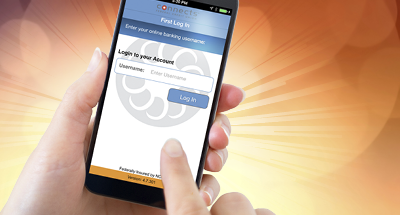
Your link to 24-hour banking!
- Pay Connection Enjoy the convenience of Connects free online bill pay service! Pay an unlimited amount of bills each month. Sign up now!
- Online Branch Its FREE. Its easy. It only takes a PIN to perform transactions, transfer balances, view and download account information and more. Bank online, on your time, anytime! For more information, email or call 756-5000.
My Connection
To access My Connection for the first time, all members will need to visit our
secure online branch, select Enroll Online and complete the form. You will pick your own user ID and password in the enrollment process. Once enrolled, you will be given immediate access to the system.
Some new features in My Connection include:
- Accounts: All of your accounts will display in My Connection. You will have the option to remove any from the interface if you wish.
- Transfers: Transfer funds between accounts on a one-time basis, or schedule repeated transfers.
- Reports: Online features to help you organize your finances.
- Mailbox: A secure messaging center for you to communicate with Connects.
eStatements
eStatements is the
FREE electronic delivery of your Connects statement. Accessing your eStatements in My Connection Online Banking will be as easy as a click of your mouse. Every month youll receive an email at the address we have on file notifying you that your statement is available.
Youll enjoy the following eStatement benefits:
- Convenience Access your eStatements anytime
- Statement Archive Your eStatements are archived for 12 months
- Security Your eStatements are protected by the latest security measures
- Printable Everything is printable should you need a hard copy
- Control You can always opt out and have your paper statement mailed to you
Connects Federal Credit Unions eStatement service means you wont have to wait for your statements to arrive by mail and you wont have to worry about your statement sitting in your mailbox. Plus youre helping your credit union save money in printing and postage!
If you wish NOT to be enrolled in eStatements and want to continue to receive paper statements, please email your request to
onlinebranch@connectsfcu.org.
And more! Please take the time to explore the features of
My Connection. Select the Help button for detailed explanations of the features.
My Connection security feature issue submit button vanishing
We have discovered a minor bug that occurs due to differences in computer screen resolutions. This issue causes the Submit button to vanish from view on the bottom of the page in which you select your questions and answers.
Not all members experience this; its based on individual computer screen resolutions.
If you are experiencing difficulties enrolling in the new security feature please follow these instructions:
- Begin the process of setting up your security.
- Complete your security questions and answers.
- If you do not see a Submit button, simply press the ENTER key on your keyboard.
- You should receive a confirmation page. On this page you WILL see a Submit button and an Edit button. Make your selection to continue and you will be logged on.
This process is required to continue to use My Connection. This security feature protects you from unauthorized use of your My Connection account. Financial institutions are regulated to have these important processes in place. Required PIN changes at certain intervals and updating of security features at certain intervals are also required. We appreciate your patience and understanding. If you have additional questions or concerns please e-mail
onlinebranch@connectsfcu.org.